AI dictation app

AI dictation app: turn your voice into text you can use

Record & TranscribeTurn your spoken thoughts into a first draft, ready to review and edit.
Illustrative recording view Open recorder
Less typing. More useful text.

What an AI dictation app does

Speak instead of typing

Typing out what you said takes far longer than saying it, and rough auto-captions still need fixing line by line.

With Cockatoo you dictate a note on your iPhone, or record a conversation and upload it, and get text you can quote, search and share.


Upload, get the text, export it

There's nothing to set up. Drop a recording in your browser, get the transcript, usually within minutes, and download it in the format you need.

Built in-house

Why Cockatoo for dictation

Its own engine, and no ads

Cockatoo runs its own transcription engine, not a third-party API, and doesn't run ads.

When you need help, a person answers, Monday to Friday during US business hours.

No daily limit on free transcripts

Full-length transcripts in V4-Flash are free, with no daily limit. Pro adds unlimited live recording and dictation.

Choose a mode for each file

Cockatoo builds and versions its engine in-house. Pick V4-Flash for speed, or V4-Pro for the most accurate result.

Choose your transcription mode

Designed for the fastest turnaround, at up to 120Ɨ real time.

Mode preview Ā· Select your mode when uploading.
Three steps to something useful

From voice note to finished transcript in three steps

  1. Step 1

    Upload a file or paste a link

    Upload a recording, or paste a YouTube, Vimeo or SoundCloud link or a public link to a file. Cockatoo detects the language and shows right-to-left scripts correctly.

  2. Step 2

    Edit, then turn it into notes

    Fix the transcript in the browser, then open it in Canvas to turn it into meeting notes, a blog draft or a study guide. Canvas is included on Pro, and free accounts can try it.

  3. Step 3

    Export text or subtitles

    Upload a video and Cockatoo transcribes its audio. Export the transcript as SRT or VTT subtitles, or as DOCX, PDF, TXT, CSV or JSON.

YouTubeVimeoSoundCloudFile linkYour device
Sofia00:02

Note for tomorrow's presentation: open with the problem we're trying to solve, then explain why it matters.

Sofia00:10

Add an example from the customer interviews. Keep it specific, and leave time for questions at the end.

Sofia00:18

Before sharing the draft, check the names, review the key points, and turn these notes into a short outline.

Voice note Ā· Illustrative transcript
DOCXPDFTXTSRTVTTCSVJSON
Made for your next task

What people use it for

Subtitles for marketing or training video

Upload the video, export the transcript as SRT or VTT and import it into your video editor. You don't type captions or timestamps by hand.

Translating documents

Cockatoo also translates PDF, DOCX, PPTX, XLSX and TXT files, so you don't have to copy text into a separate translation tool. Free accounts can preview file translation.

Fixing names and terms

Open the transcript in the browser editor and correct names, technical terms or jargon. Your edits are saved with the transcript.

At your desk. On your phone.

Works on iPhone and the web

The iPhone app

Cockatoo's iPhone app records and dictates. The web app handles uploads, editing and exports.

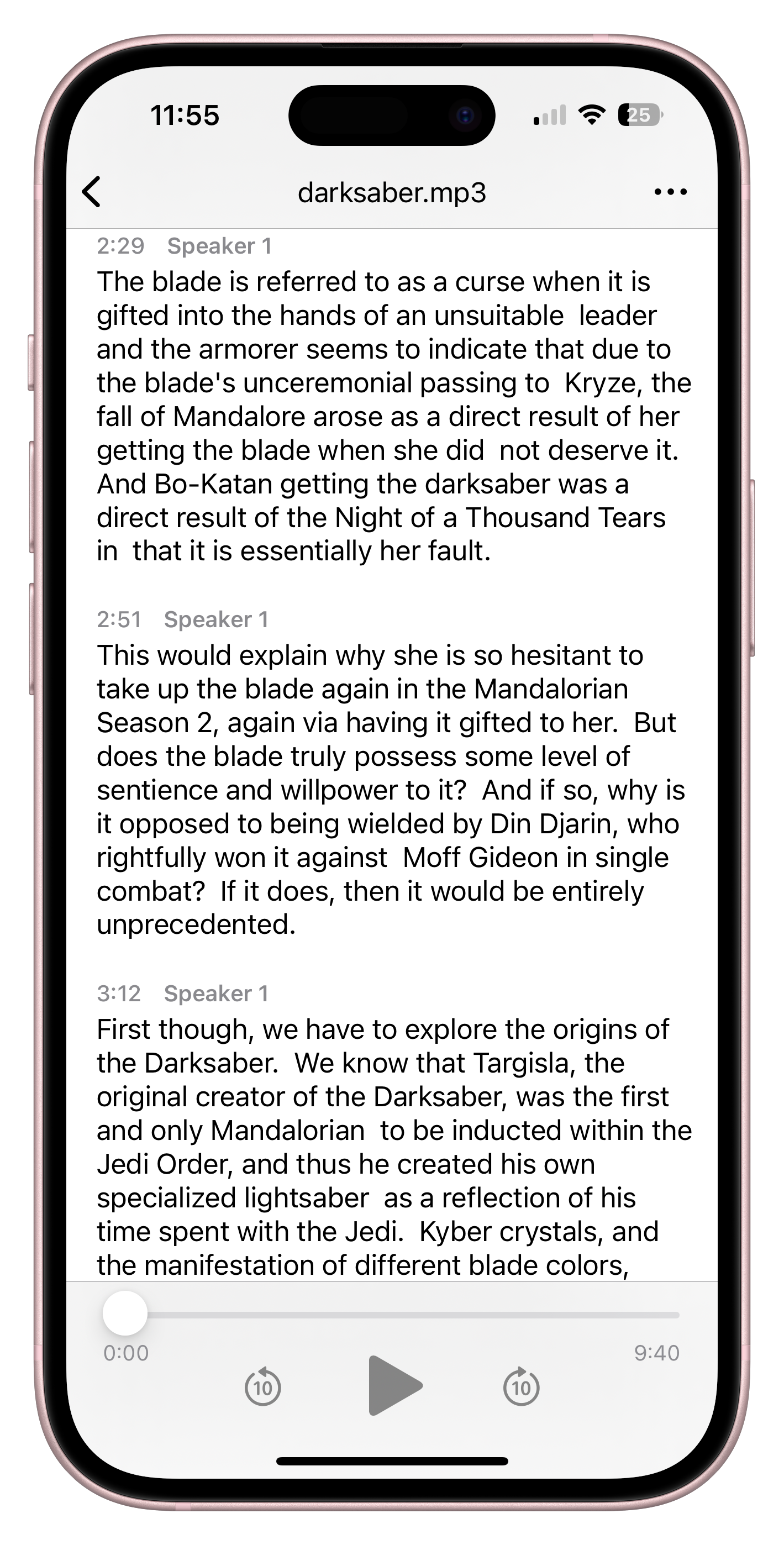
Cockatoo iPhone transcript with speaker labels, timestamps, and playback controls

Your recordings in one place

Recordings, transcripts and documents stay in your account, encrypted in transit and at rest. Share a transcript instead of sending a large file.

Library
Research interview.mp3
Interview transcript
Research notes
Your files, together
iPhoneAvailable nowWebAvailable now
Real recordings. Real feedback.

What reviewers say

Trustpilot review
ā€œIt works fast and the quality and accuracy are spot on. Love the service!ā€
Al Ā· United States Ā· Read review

Reviews from real work

People review Cockatoo after using it on their own recordings, not demo files.

Accents, speed and ease of use

Reviewers often mention accuracy on difficult accents and regional dialects, transcription speed and how easy the first upload is.

United StatesEuropean Union

Your files, opened only with your permission

Support engineers only open your files when you give permission.

ā€œThe app has simplified my dissertation work by trascribing the interviews I am working with currently.ā€
Guillermo B.TaiwanRead review
ā€œThis transcriber is incredibly accurate, and not bothered by all the different accents i present it with. Highly recommended.ā€
Ian A.AustraliaRead review
Questions, answered

Common questions about AI dictation

See all FAQs

Both. The iPhone app records and dictates, and you can dictate into a note in the Cockatoo web app. Pro includes unlimited live recording and dictation.

Turn your next recording into text

Start transcribing free
Drag and drop
MP3MP4M4AMOVAACWAVOGGOPUSMPEGWMV
OR

Get your full transcript free. No credit card required.