
Cockatoo for iPhone

Cockatoo Voice To Text App for AI voice notes

The perfect companion for quick note-taking, content creation, and capturing ideas on-the-go.

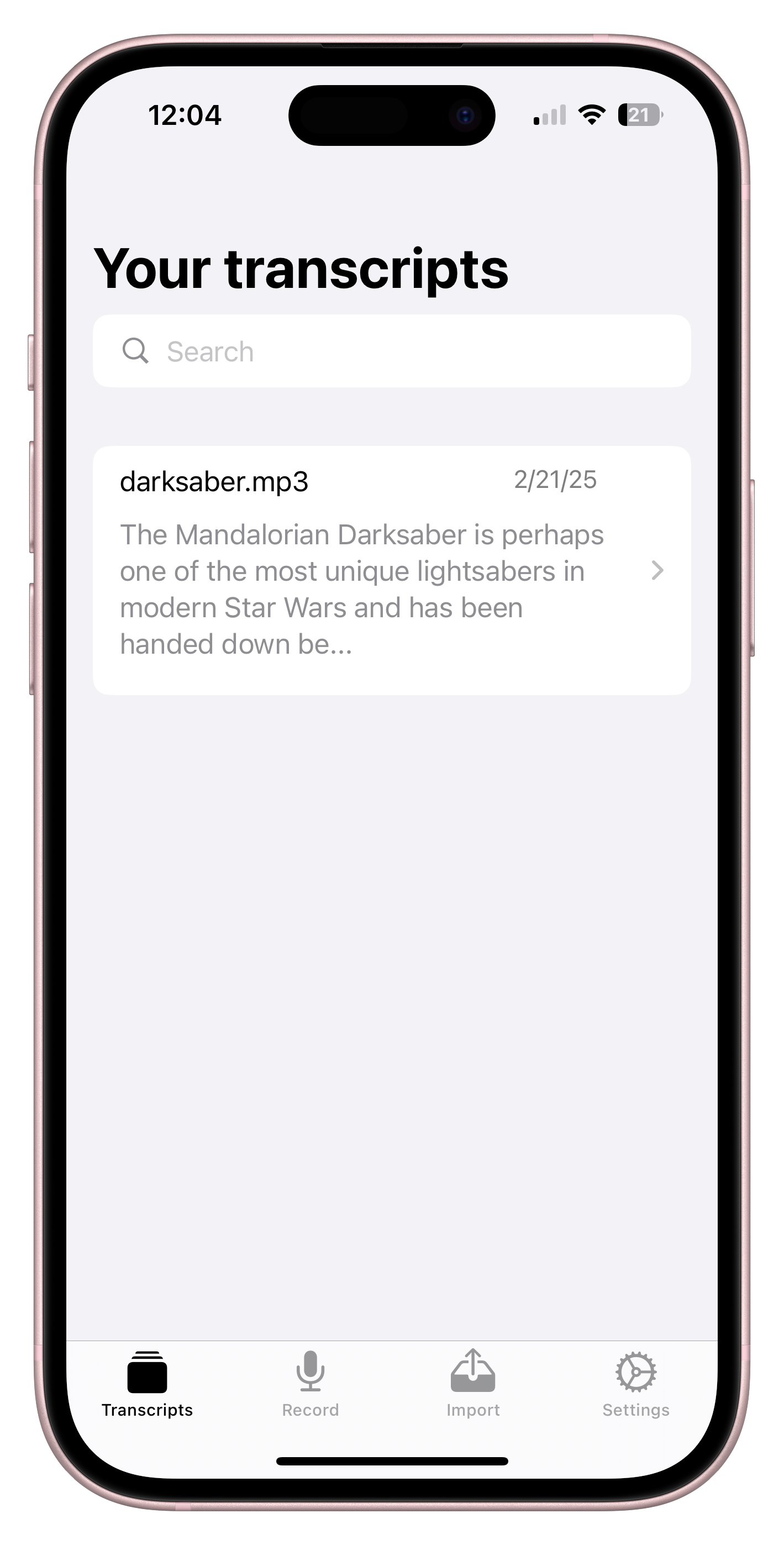
Cockatoo iPhone app showing saved transcriptsCockatoo iPhone transcript with speaker labels, timestamps, and playback controls
Quick answer

What Is a Voice To Text App?

Real-Time Dictation and File Transcription

A voice to text app turns spoken words into written text. Real-time dictation apps like Gboard and Apple Dictation type as you talk, perfect for quick messages and notes. File transcription apps like Cockatoo take your audio or video recordings and return accurate, editable transcripts with speaker labels and timestamps.

Cockatoo handles both workflows: live dictation through the iOS app for capturing ideas on the go, and file transcription on the web for turning interviews, meetings, and lectures into text. Upload any audio or video format, get your transcript in seconds, and export to DOCX, PDF, TXT, or SRT.

Speak now. Or start with a recording.

How Voice to Text Apps Work

Live Dictation: Speak and See Your Words Appear

Live dictation apps listen through your device microphone and type as you talk. Open the app, tap the mic icon, and start speaking. Your words appear on screen in real time, perfect for drafting emails, taking quick notes, or capturing ideas without typing.

Cockatoo's iOS app includes built-in voice dictation powered by the same in-house transcription engine that handles file uploads. Just open the app and start talking.
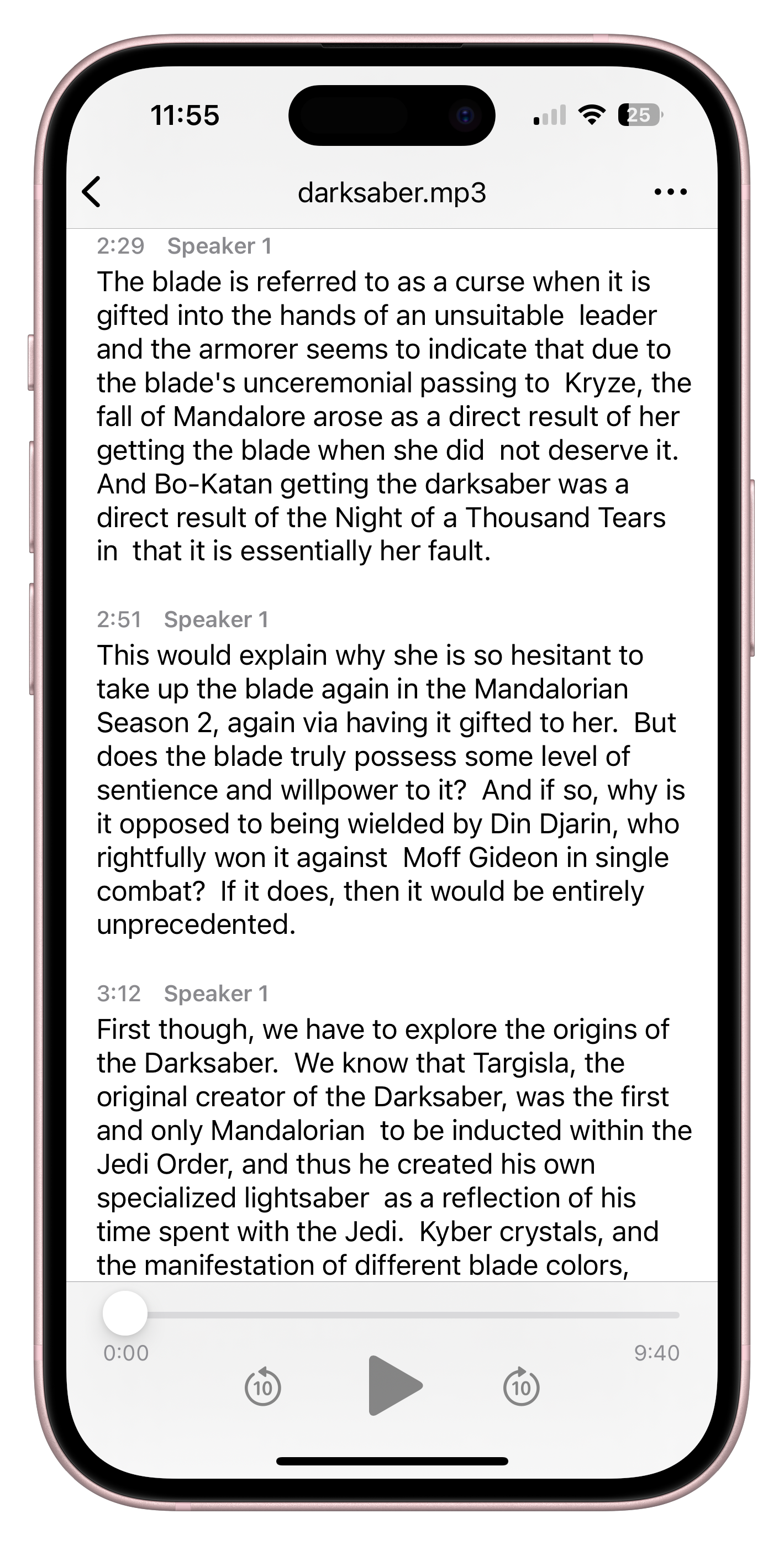

Cockatoo iPhone transcript with speaker labels, timestamps, and playback controls

File Transcription: Upload and Get Your Transcript Back

File transcription apps take a recording you already have and turn it into text. Upload your audio or video file, wait a few seconds, and download your transcript.

No setup required. Drop in your file, pick your language if it is not auto-detected, and get a transcript with speaker labels, timestamps, and punctuation applied automatically. Edit in the browser, then export to the format you need.

Record & TranscribeTurn your spoken thoughts into a first draft, ready to review and edit.
Illustrative recording view Open recorder

In-House Engine, Not a Reseller

Cockatoo runs its own in-house transcription engine, trained on real-world audio with accents, background noise, and dialects.

Speaker recognition, word-level timestamps, and clean-verbatim formatting are applied automatically. Fix a term the model missed and the custom vocabulary remembers it for next time.

Cockatoo V4-Pro · FLEURS
LanguageWord error rate
English3.9%
Spanish1.0%
French7.8%
German2.4%

Lower is better. Selected per-language results from the public benchmark. Updated October 27, 2026.

Explore the full accuracy report

No Downloads Needed for Web Transcription

Cockatoo's web transcription works entirely in your browser. No software to install, no desktop app to download.

Upload a file, get your transcript, and export. The iOS app is there when you need dictation on your phone, but the web tool handles everything else.

Files stay private. Data is retained while the account is active, and removed on account or file deletion.

Support engineers access your files only with your explicit permission.

United StatesEuropean Union
Choose what fits your day

Choosing the Right Voice to Text App for Your Workflow

For Quick Notes and Messages: Built-In Dictation

If you need to type a quick message or jot down a thought, the dictation tools already on your phone work fine. Gboard, Apple Dictation, and Google Docs Voice Typing are free, require no download, and type as you talk. They are perfect for short bursts of text when your hands are full.

Cockatoo's iOS app adds AI-powered dictation for longer notes and idea capture, with the same accuracy engine that handles file transcription. Your notes sync to your account, and you can edit or export them later.

For Transcribing Recordings: File Upload Tools

When you have an interview, lecture, or meeting recording and need an accurate transcript, a file upload tool is the right choice. Cockatoo transcribes audio and video files in any format, with speaker labels, timestamps, and export to DOCX, PDF, TXT, or SRT.

For Live Meeting Transcription: Meeting Bots

If your main need is a bot that joins Zoom, Teams, or Google Meet calls and transcribes in real time, a dedicated meeting assistant is the better fit. These tools integrate with your calendar, join calls automatically, and turn meetings into searchable team knowledge.

Cockatoo focuses on file transcription and document translation rather than live meeting bots.

For Multilingual Work: Transcription Plus Translation

If you work across languages, you need a tool that handles both transcription and translation without paying for two separate subscriptions. Cockatoo transcribes audio and video with language support that varies by transcription mode, then translates the transcript or any document (PDF, DOCX, PPTX, XLSX and TXT) into another language while keeping the formatting intact.

Upload a recording in one language, get the transcript, and translate it into another in the same workflow. Or translate a PDF contract, slide deck, or report without rebuilding the layout. Both features are included in Pro.

For Storage and Transfer: Bundled Drive Space

Some tools charge separately for storage and file transfer, which adds up fast if you keep an archive of transcripts or share large files with clients.

Upload your files, transcribe them, and keep the originals and transcripts in one place. Share files with a link, no separate cloud storage subscription required. Your transcripts and recordings stay accessible as long as your account is active.

YouTubeDropboxGoogle DriveYour device
The details that make the difference

What Makes a Transcription Tool Worth Using

Accuracy You Can Verify

Accuracy claims are easy to make and hard to verify. Look for tools that publish their accuracy results on real test data, not just a percentage with no evidence.

File Format Flexibility

A good transcription tool accepts any audio or video format without making you convert files first. Cockatoo supports common audio formats (MP3, WAV, M4A, FLAC, OPUS, AAC, and more) and every common video format (MP4, MOV, AVI, MKV, WEBM). OPUS support means WhatsApp voice notes work directly.

Video files have their audio extracted automatically, with no transcoding step.

Export Options That Match Your Workflow

A transcript is only useful if you can get it into the format you need. Look for tools that export to DOCX for editing in Word, PDF for sharing, TXT for plain text, and SRT for video subtitles. Cockatoo supports all four, with timestamps and speaker labels included in every export.

Bulk export lets you download multiple transcripts at once. Edit in the browser with Canvas, Cockatoo's built-in AI notes editor, then export when you are done. Unlimited Canvas use on Pro.

Speaker Recognition and Timestamps

If your recording has multiple speakers, you need a tool that can tell them apart and label each line. Cockatoo includes speaker recognition with a settable speaker count.

Rename a speaker once and every line updates. Word-level timestamps let you jump to any part of the recording.

Export options include paragraph, sentence, and speaker-turn timestamps. Clean-verbatim style by default, which means filler words and false starts are removed for readability. A true-verbatim setting is coming in the next highest-accuracy mode release.

Speed That Saves Hours

Manual transcription of a one-hour recording takes most of a working day. A fast transcription tool should return your transcript in minutes, not hours.

MP3WAVM4AFLACOPUSAACMP4MOVAVIMKVWEBM
Sofia00:02

Note for tomorrow's presentation: open with the problem we're trying to solve, then explain why it matters.

Sofia00:10

Add an example from the customer interviews. Keep it specific, and leave time for questions at the end.

Sofia00:18

Before sharing the draft, check the names, review the key points, and turn these notes into a short outline.

Voice note · Illustrative transcript
One recording. More possibilities.

Common Use Cases for Voice to Text Apps

Interviews and Research

Turn interview recordings into quotable transcripts without retyping every word. Upload your audio or video file, get a transcript with speaker labels, and export to DOCX for editing. Researchers, journalists, and students use Cockatoo to transcribe interviews, focus groups, and oral histories.

Speaker recognition keeps each person's lines separate, and timestamps let you jump back to the recording to verify a quote.

Meetings and Calls

Capture what was said in a meeting or client call without taking notes by hand. Record the call, upload the file, and get a transcript with action items and decisions clearly labeled. Export to PDF to share with your team or keep in your files for reference.

Cockatoo transcribes uploaded recordings, not live calls. If you need a bot that joins Zoom or Teams automatically, a dedicated meeting assistant is the better fit. But if you record calls yourself and need accurate transcripts afterward, Cockatoo handles it in seconds.

Lectures and Training

Turn lecture recordings into study notes or training materials. Students upload class recordings and get transcripts they can search, highlight, and review. Trainers transcribe workshops and webinars to create written guides and reference docs.

Podcasts and Video Content

Transcribe podcast episodes for show notes, blog posts, and SEO. Upload your final audio file, get a transcript, and edit it into a written version of the episode. Video creators use Cockatoo to generate SRT subtitle files for YouTube, social media, and accessibility.

One documentary producer transcribes interview footage and exports SRT files with every timestamp intact. The subtitle file goes straight into the editing software, no manual syncing required.

Legal and Compliance

Transcribe depositions, hearings, and client consultations for legal records. Accuracy matters when every word counts, and Cockatoo's published accuracy tests show how the engine performs on real-world audio. Export to PDF for filing or DOCX for redaction and editing.

Speaker labels keep each person's testimony separate. Word-level timestamps let you reference the exact moment in the recording. Files are processed in the US and EU, and support engineers access them only with your explicit permission.

Multilingual Content and Translation

Transcribe audio in dozens of languages, then translate the transcript or translate documents directly. Mixed-language files with code-switching are supported.

Arabic, Hebrew, Persian, and Urdu display right-to-left in the interface and exports. One tool for both halves of the job: get the words out of the audio, then get them into another language.

Questions, answered

Questions About Transcription

View pricingFile and plan limits

Background noise, heavy accents, and crosstalk lower accuracy, but the in-browser editor makes fixes quick.

Speaker labels and timestamps are applied automatically. Rename a speaker once and every line updates. The custom vocabulary remembers terms you fix, so accuracy improves over time on your specific audio.

Cockatoo supports common audio formats, including MP3, WAV, M4A, FLAC, OPUS, AAC, and more. All common video formats work too: MP4, MOV, AVI, MKV, WEBM. OPUS support means WhatsApp voice notes upload directly without conversion.

Video files have their audio extracted automatically, with no transcoding step. Upload a video, get a transcript, and export as an SRT subtitle file alongside DOCX, PDF, or TXT.

Your next idea, ready to use

Try Cockatoo on the web
Download on the App Store
Превуците и отпустите
MP3MP4M4AMOVAACWAVOGGOPUSMPEGWMV
ИЛИ

Započnite besplatno. Nije potrebna kreditna kartica.