Import sources

Integrations & Import Sources

Paste a YouTube, Google Drive, Dropbox or iCloud link, drop in any audio or video file, or record live in the browser and on the iOS app. Cockatoo detects the language and hands back a transcript in seconds. Full-length transcripts are free in V4-Flash, with no daily limit and no credit card.

Import From YouTube, Dropbox, Google Drive, and Pasted Links. Upload Any Audio or Video Format. Automatic Language Detection.

Cockatoo accepts files from YouTube, Dropbox, Google Drive, and pasted links. Every common audio and video format uploads without conversion, and the language is detected automatically.

Mixed-language recordings work. If your file switches between languages mid-recording, Cockatoo transcribes it.

  • YouTube, Google Drive, Dropbox, iCloud
  • Record on web and iPhone
  • MP3, MP4, MOV, WAV and more
  • 36 languages, detected for you
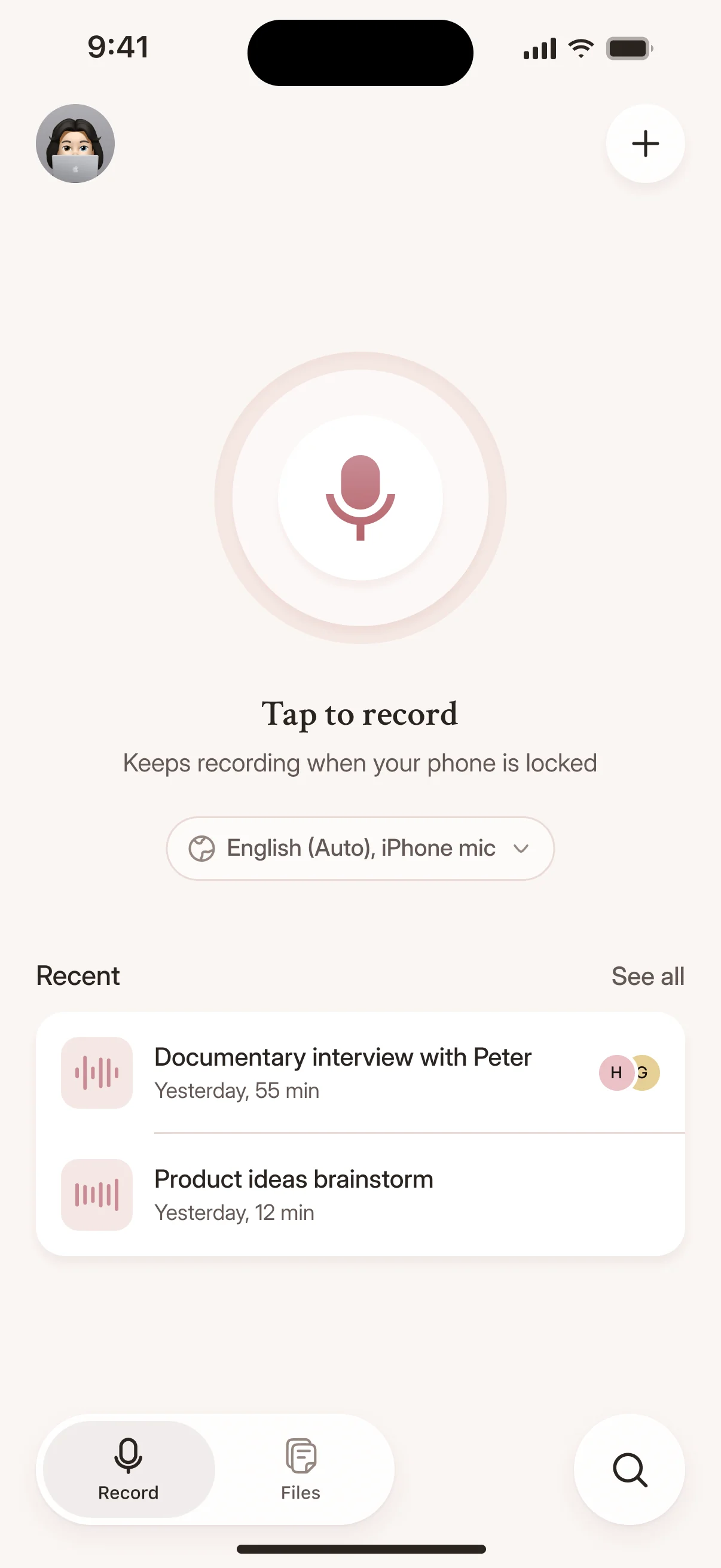
Cockatoo iPhone app home screen with recent recordings
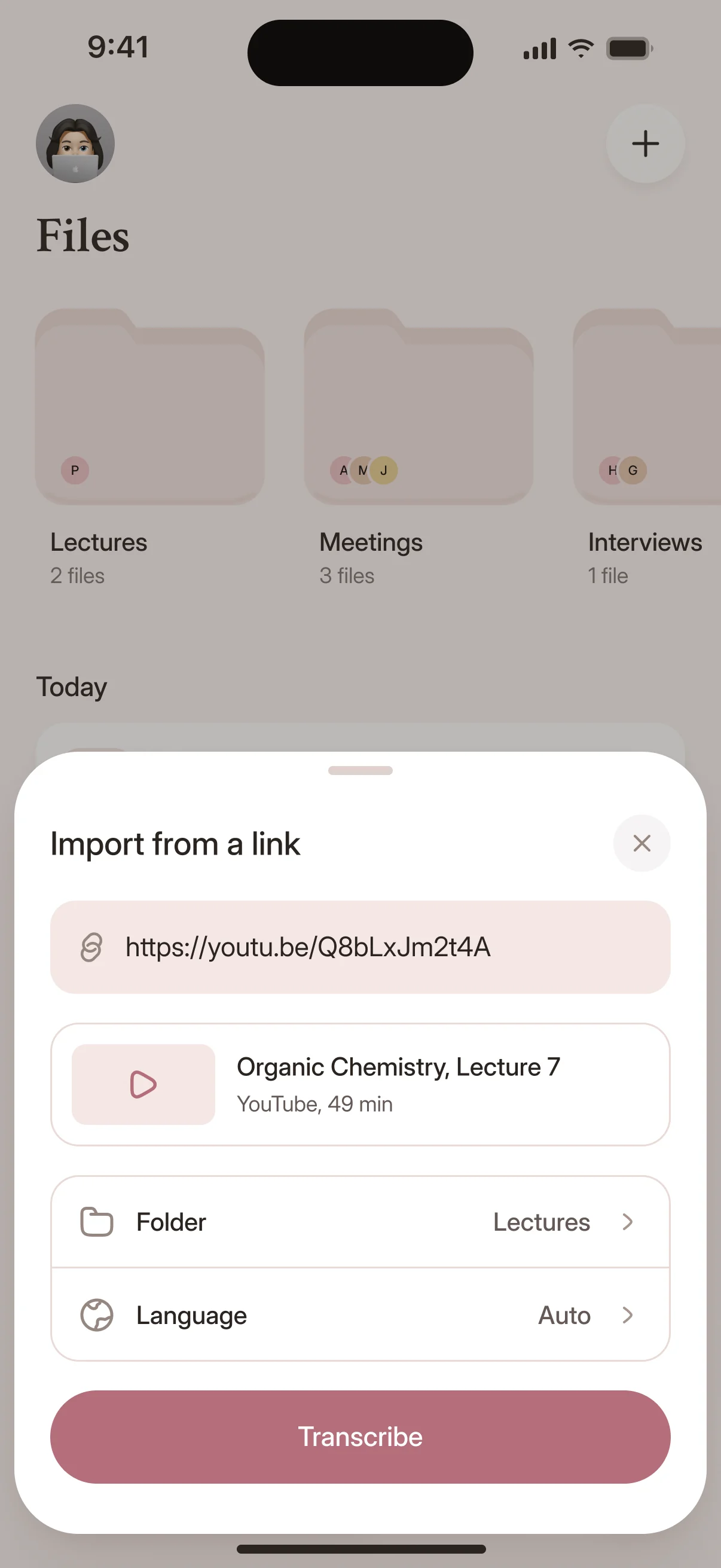
Importing a recording from a link in the Cockatoo iPhone app
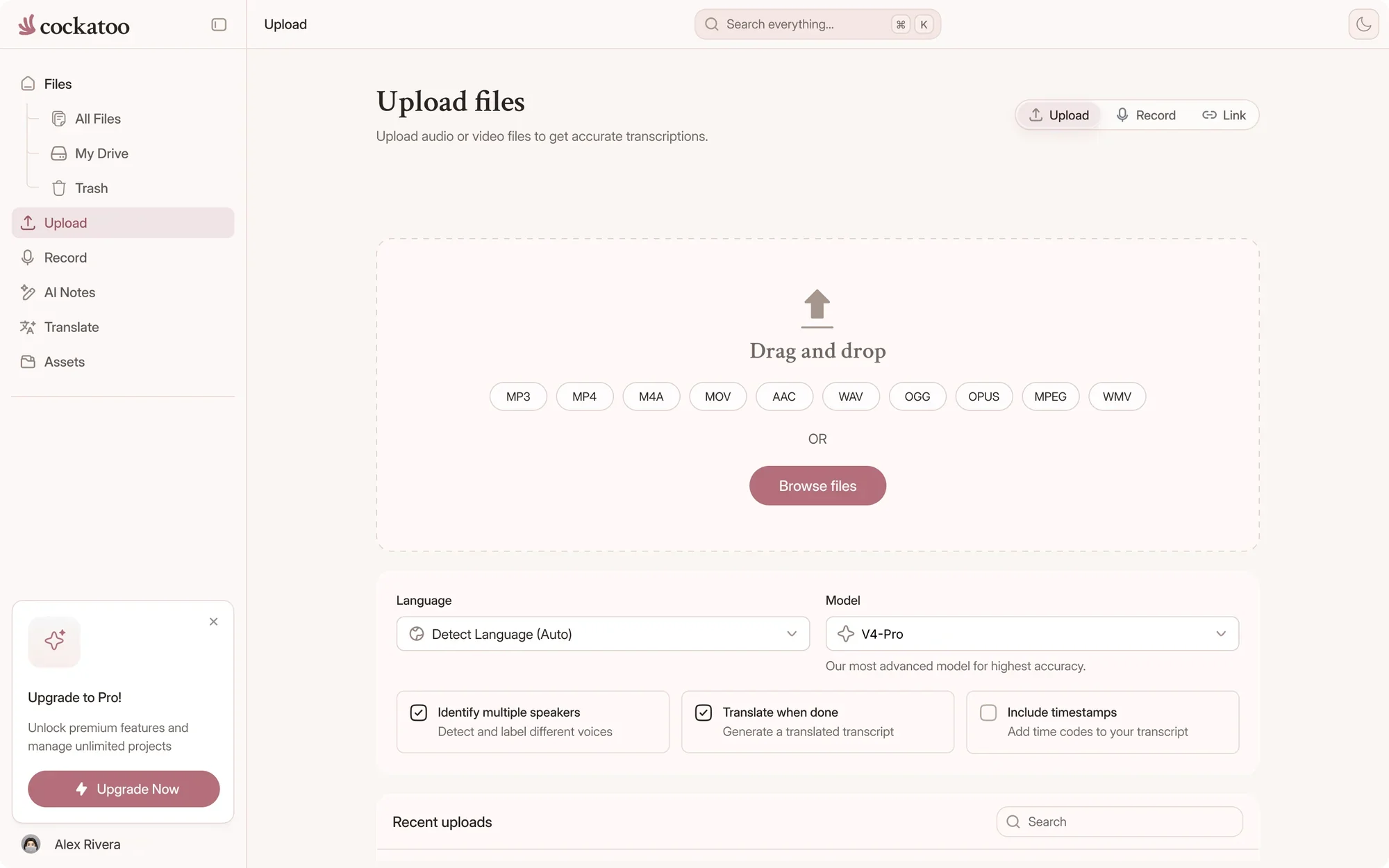
Drag and drop
MP3MP4M4AMOVAACWAVOGGOPUSMPEGWMV
OR
The problem

What You Need to Know About Import Options

Every step between your recording and the text costs you time. Cockatoo takes those steps out.

You Waste Time Converting Files and Tagging Languages Before You Can Even Start

Most transcription tools make you convert video to audio first, then guess the language, then upload.

Every extra step adds friction. Guess the language wrong or miss a format requirement, and you start over.
Interview, Call, Podcast, and Lecture Audio Sits Unusable Until Someone Types It Out

Recordings are valuable when you can search them, quote them, and share specific moments.

Manual transcription burns hours per file. The work piles up faster than you can clear it.

Video Content Stays Inaccessible and Unsearchable Without Manual Captioning

Publishing video without captions excludes viewers and kills discoverability.

Typing captions by hand or cleaning up auto-generated output takes longer than the video itself.

Where files come from

Import Files From YouTube, Dropbox, Google Drive, and Pasted Links

Every way a recording gets into Cockatoo: upload a file, paste a link, or record live in the browser or on the iOS app.

Ways to get a recording into Cockatoo
FeatureHow it worksWhere
Upload from your deviceDrag in any common audio or video file, such as MP3, M4A, WAV, MP4 or MOVWeb app, or the homepage before you sign up
YouTube linkPaste the video link and Cockatoo imports the audioUpload window in the web app
Google Drive linkPaste the share link to an audio or video fileUpload window in the web app
Dropbox linkPaste the share link to an audio or video fileUpload window in the web app
iCloud linkPaste the iCloud Drive share linkUpload window in the web app
Public file linkA link that opens an audio or video file without a loginUpload window in the web app
Live recordingRecord live from your microphone, unlimited on ProRecord tab in the web app
iOS appRecord lectures, meetings and dictation on your iPhone, see the iOS appiOS app

Checked against the product as of November 2026.

Detected languageالعربية
  • English
  • Español
  • العربية
  • 日本語
  • עברית
  • Deutsch
  • فارسی
  • Français
  • اردو

00:14 مرحبًا بكم في المحاضرة الرابعة

Cockatoo Detects the Spoken Language Automatically Before Transcription Starts

Upload the file and Cockatoo identifies the language without you tagging it.

If the auto-detection is wrong or you want to force a specific language, override it on a per-file basis. V4-Pro asks you to choose the language at upload.

Right-to-left languages display correctly in the transcript editor. No extra configuration.

Cockatoo AI notes generated from a recording

In-Browser Transcript Editing and AI Notes Let You Work With the Output Immediately

Edit the transcript directly in the browser. Fix names, remove filler words, adjust timestamps.

Canvas, the AI notes editor, summarizes the transcript into structured notes without leaving the page.

Formats

Upload Any Audio or Video Format Without Converting First

MP3, M4A, WAV, MP4, MOV and dozens more go straight in. No converter, no re-encoding, no guessing.

45audio file types, from MP3 and M4A to FLAC and OPUS
19video file types, including MP4, MOV, MKV and AVI
7export formats, free on every plan

Video Audio Is Extracted Automatically and Exported as SRT Subtitle Files

Upload MP4, MOV, AVI, or any common video format and Cockatoo transcribes the audio track.

Export the finished transcript as an SRT file with timestamps, ready to drop into your video editor or publishing platform.

Audio and Video Uploads Become Editable Transcripts With Speaker Labels, Timestamps, and Punctuation

Cockatoo delivers a transcript with speaker recognition so you know who said what, timestamps for every paragraph, and punctuation already in place. Speaker labels come with V4-Pro, on paid plans and in the weekly previews on Free.

The transcript opens in an editable editor. Correct names, adjust speaker labels, and export to PDF, DOCX, TXT, SRT, VTT, CSV or JSON; bulk export from your library is supported.

interview-03.m4a Renamed everywhere
04:02
Dr. Okafor

Let's start with the sampling. Why twelve schools?

04:09
Maya

We wanted rural and urban sites in every region.

04:17
Dr. Okafor

And the consent forms went out before the first visit?

Upload Files Straight From Your Device

Drag a file into the uploader or pick one from your computer. Cockatoo accepts MP3, M4A, WAV, AAC, FLAC, OGG, OPUS, WMA, MP4, MOV, MKV, WEBM, AVI and many more.

No need to convert video to audio or change the file type first.

Cockatoo upload screen: drop in audio or video
Languages

Transcribe in 36 Languages and Handle Code-Switching

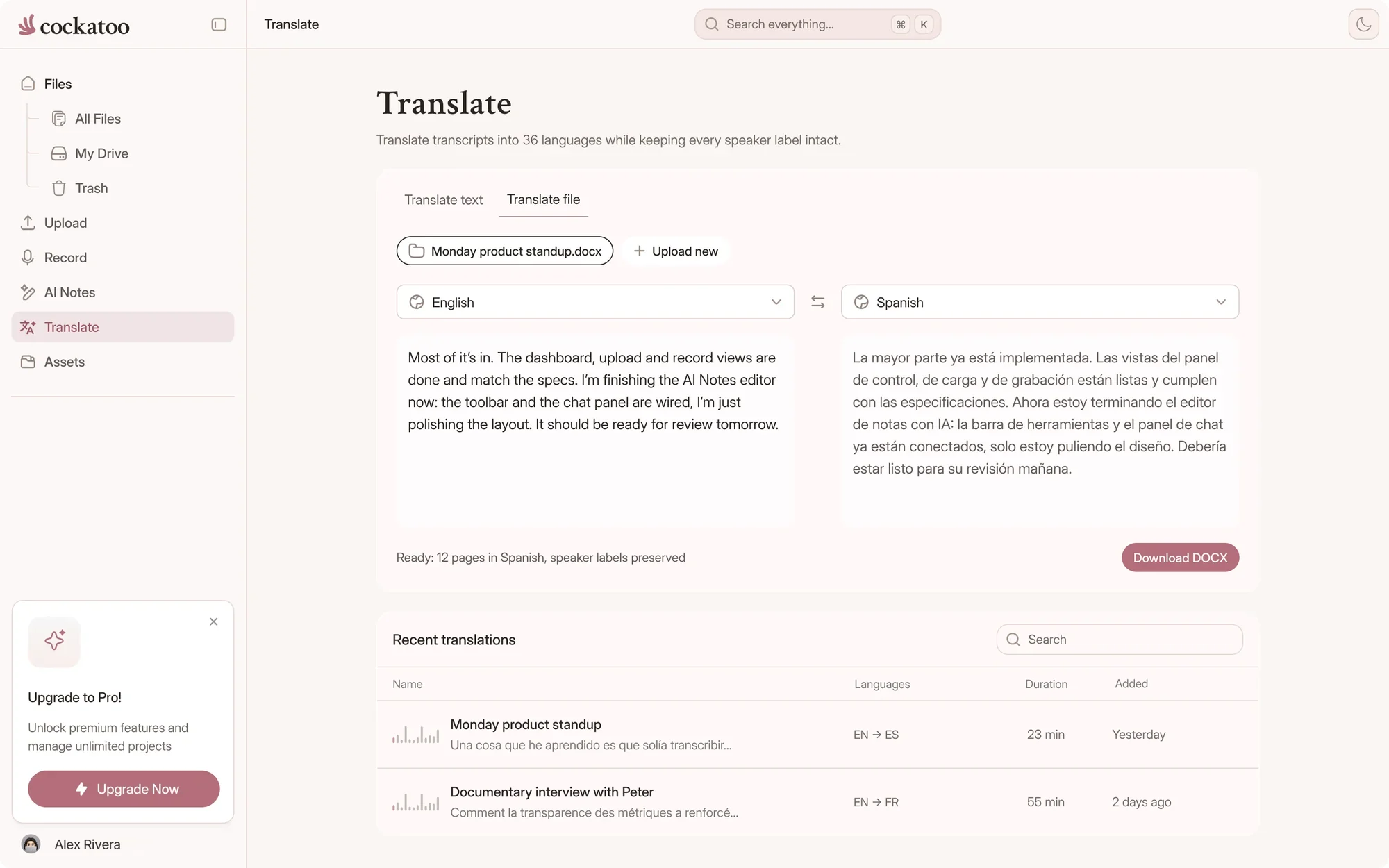
Cockatoo Translates Spoken Audio, Not Only Written Documents

Upload a recording in one language and translate the transcript into another.

Both halves of the job done in one tool.

Translating a Cockatoo transcript into another language

Mixed-Language Recordings in One Upload

Cockatoo transcribes 36 languages. When speakers move between languages in the same file, you don't need to split it into separate uploads.

Accuracy varies by language and recording quality, so check the per-language results for the languages you work in.

36transcription languagesSee every language
Speed and accuracy

Transcripts in Seconds, Accurate Enough to Publish

Paste the link, and the transcript is ready before the video would have finished buffering.

120xreal-time speed in V4-Flash, at most
~30 sfor a one-hour recording in V4-Flash
~20xreal-time speed in V4-Pro, the most accurate mode

Cockatoo Transcribes at Up to 120x Real-Time in Fastest Mode

A one-hour recording returns a finished transcript in about 30 seconds.

V4-Pro, the most accurate mode, runs at about 20x real time and still delivers a finished transcript in seconds, not hours.

The Cockatoo mascot gliding with its wings out

You Get a Working Transcript Before You Finish Your Coffee

Upload a file, switch tabs, and the transcript is waiting when you come back.

No processing delay long enough to make you context-switch away from the task.

Cockatoo V4-Pro on FLEURSError rate · lower is better
  • English3.9% WER
  • Spanish1.0% WER
  • German2.4% WER
  • French7.8% WER
  • Japanese6.5% CER

Accuracy varies by language and recording quality. Updated October 27, 2026. Full results and method

Accuracy You Can Audit: Published Per-Language Tests Covering 36 Languages

Cockatoo publishes accuracy tests for 36 languages using the same public test set researchers use to compare transcription engines, plus real-world audio examples.

Every test includes public-domain sample files. Verify the claims yourself instead of trusting a marketing percentage.

“The combination of speed, simplicity, and clear language options makes Cockatoo a practical and reliable solution for transcription.”
Dimitri F.Caribbean NetherlandsRead review
“The transcription accuracy is impressive, and the export options make it simple to work with transcripts in various formats.”
Bill N.United StatesRead review
“Cockatoo separated speakers and sentences, with timestamps, making it way easier to read.”
Heidi C.CanadaRead review
Privacy

Your Files Stay Private

Processing Runs in US and EU Data Centers, Support Accesses Files Only With Your Explicit Permission

Your files are stored and processed in the US and the EU (Finland).

Support engineers can view your files only if you grant permission during a support request. Never by default.

United States European Union (Finland)

Where your files are stored and processed

Unlimited Transcription, Engineered for Efficiency

Cockatoo is built on state-of-the-art deep learning, engineered to be fast and efficient.

That's why V4-Flash is unlimited on every plan, including Free. See what each plan adds on the pricing page.

Per-hour transcription services

Billed by the audio hour Hour caps on most plansMonthly hour limit

Cockatoo V4-Flash

Engineered for speed and efficiency Included on every plan, even Free Unlimited V4-Flash
FAQ

Common Questions About Import Sources and File Handling

Short answers about links, formats and live recording.

Visit the help center

No. Cockatoo detects the language automatically and handles every common audio and video format without conversion. Upload once and Cockatoo handles the rest, regardless of the source. In V4-Pro, you choose the language at upload.

Bring your first recording in

Get your full transcript free, with no daily limit. Try industry-leading accuracy with V4-Pro.

Start Transcribing Free