
Accessible captions and transcripts

Transcripts and Captions for Accessibility (ADA, AODA, WCAG)

Get the caption files and transcripts WCAG asks for in recorded media, in seconds. Upload audio or video, or record live in the web app or on iOS, then export SRT, VTT, DOCX or PDF. Full-length transcripts are free in V4-Flash, with no daily limit and no credit card.

Blazing Speed. Incredible Accuracy. AI Transcription Built for Accessibility.

Upload audio or video and get accurate transcripts with speaker labels and timestamps in seconds. Export SRT captions, translate to other languages, make your content accessible.

  • Unlimited free transcripts
  • SRT and VTT captions
  • Transcripts for audio-only media
  • 36 languages
Drag and drop
MP3MP4M4AMOVAACWAVOGGOPUSMPEGWMV
OR
Captions, transcripts, proof

Quick Answer

Everything an accessible video or podcast needs, from one upload.

interview-03.m4a Renamed everywhere
04:02
Dr. Okafor

Let's start with the sampling. Why twelve schools?

04:09
Maya

We wanted rural and urban sites in every region.

04:17
Dr. Okafor

And the consent forms went out before the first visit?

Upload Audio or Video, Get Editable Transcripts with Speakers and Timestamps

Cockatoo identifies speakers and adds timestamps to every line. Edit the transcript in your browser, fix names the model missed, export to the format you need.
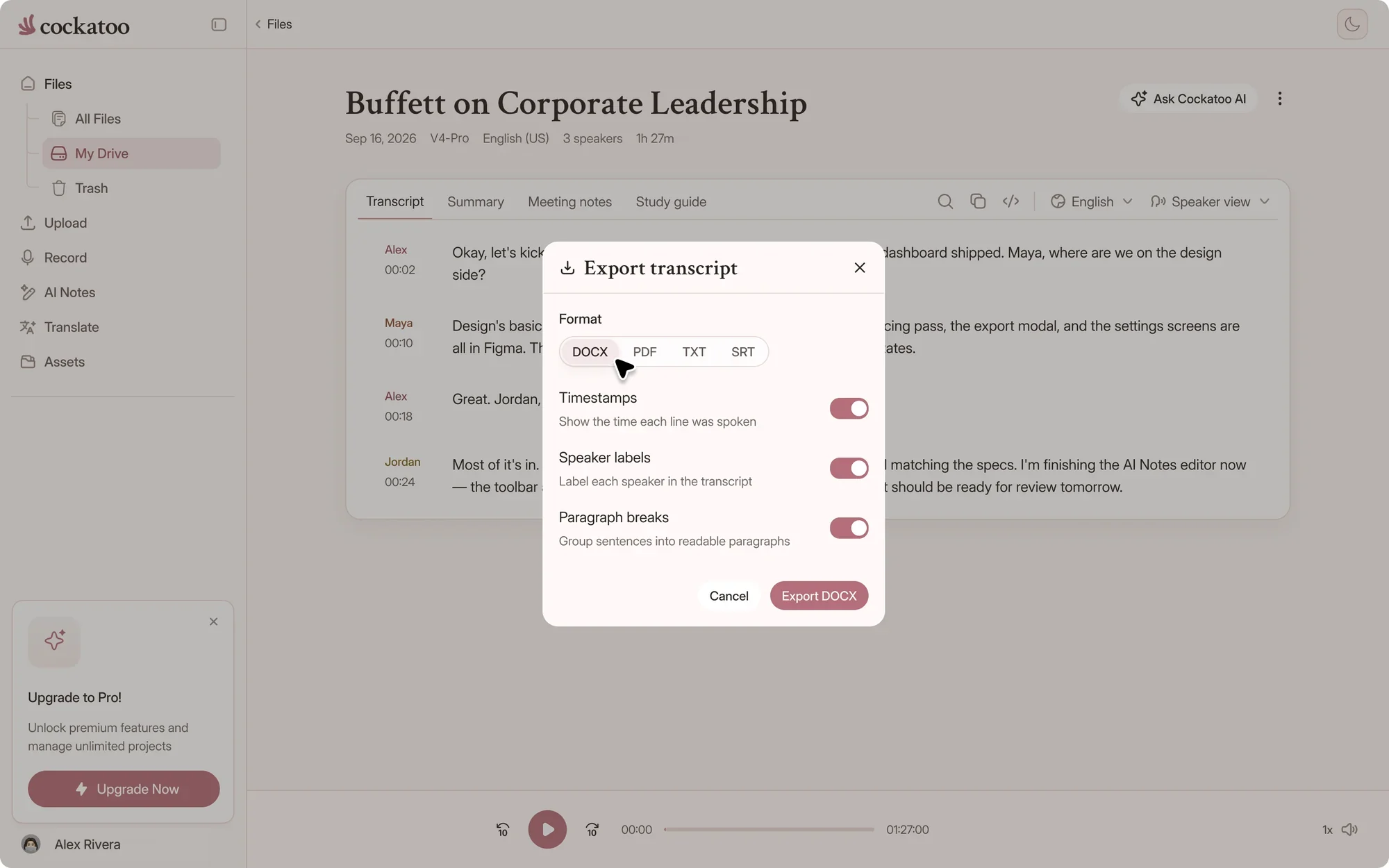
Cockatoo export menu with DOCX, PDF, TXT, SRT and more

Extract Audio and Export SRT Subtitles Alongside DOCX, PDF, and TXT

Pull audio from video files and generate SRT subtitle files ready for YouTube, Vimeo, or your video player. Export the same transcript as a Word document, PDF, or plain text in one click.

Cockatoo V4-Pro on FLEURSError rate · lower is better
  • English3.9% WER
  • Spanish1.0% WER
  • German2.4% WER
  • French7.8% WER
  • Japanese6.5% CER

Accuracy varies by language and recording quality. Updated October 27, 2026. Full results and method

Accuracy You Can Audit

V4-Pro, our most accurate mode, had the lowest error rate of the tested providers in 25 of 36 languages on FLEURS, the standard public benchmark researchers use. Methodology, real-world recordings and audio examples are published per language on the benchmarks page, and accuracy varies by language and recording quality.

“Cockatoo separated speakers and sentences, with timestamps, making it way easier to read.”
Heidi C.CanadaRead review
“The transcription accuracy is impressive, and the export options make it simple to work with transcripts in various formats.”
Bill N.United StatesRead review
“Need to do very little editing to make transcripts perfect”
Mick S.AustraliaRead review
The standard

What WCAG asks for in recorded audio and video

WCAG 2.1 and 2.2 group media rules under guideline 1.2, Time-based Media, and ADA and AODA requirements usually point back to them. Cockatoo produces the captions and transcripts these success criteria call for.

WCAG success criteria for prerecorded media, and where Cockatoo helps
FeatureHow Cockatoo helpsWhat it asks forWhat you still check
1.2.1 Audio-only and Video-only (Prerecorded), Level AA full transcript, exported as DOCX, PDF or TXTA text alternative for audio-only media, such as a podcast or recorded callSpeaker names and accuracy; video-only media needs a description of what is shown
1.2.2 Captions (Prerecorded), Level ASRT and VTT caption files with timestampsSynchronized captions for the speech in recorded videoAccuracy, timing and important sounds like [music]
1.2.3 Audio Description or Media Alternative (Prerecorded), Level AThe speech as text, a starting point for a media alternativeAudio description, or a text alternative that covers the videoDescriptions of on-screen action and text

A summary of WCAG 2.1 and 2.2 guideline 1.2, not legal advice. Read the full success criteria at w3.org and ask an accessibility specialist which apply to your content.

Captions and transcripts are different files

Captions are timed text that plays with a video, so export SRT or VTT. A transcript is the full text on its own page, which is what audio-only media like a podcast needs. Cockatoo gives you both from the same upload.

ADA and AODA both point to WCAG

In the US, the Department of Justice's 2024 ADA Title II rule uses WCAG 2.1 Level AA for state and local government websites. In Ontario, AODA's web rules use WCAG 2.0 Level AA, with live captions and prerecorded audio description exempted. Ask a specialist which rules apply to you.

Review every caption before you publish

Play the file back in the editor, fix a name or term in place, and add the sounds that matter, such as [laughter] or [music]. A quick review replaces hours of typing captions by hand.

What becomes possible

What You Need to Know About Accessible Captions and Transcripts

One upload gives you captions, a transcript, a summary and a searchable record of every word.

120xreal-time speed in V4-Flash, at most
~20xreal-time speed in V4-Pro, the most accurate mode
~30 sfor a one-hour recording in V4-Flash

Turn Interviews into Quotable Transcripts and Lectures into Notes

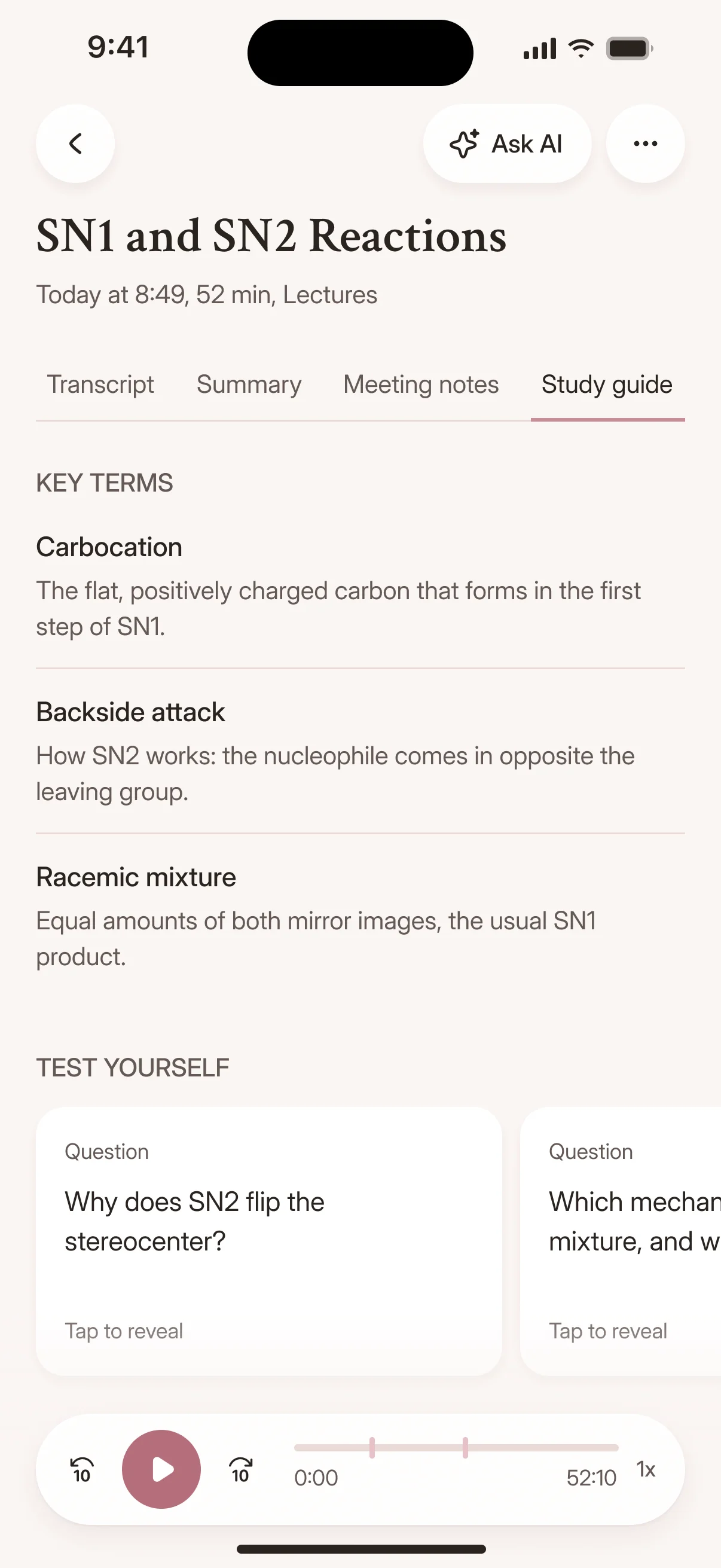
A two-hour interview becomes a searchable document you can scan at a glance. A semester of lecture recordings becomes a study guide with timestamps linking back to the exact moment a concept was explained.

A study guide generated in the Cockatoo iPhone app

Make Marketing Videos Accessible and Searchable

Your product demo, webinar, or explainer video becomes discoverable by search engines and accessible to deaf and hard-of-hearing viewers. Captions and transcripts turn video content into text that can be indexed, quoted, shared.

Condense Long Recordings into Short Summaries and Correct Missed Names

A 90-minute town hall becomes a three-paragraph summary with action items. Fix the names and technical terms the model missed, then export a polished transcript that reflects what was actually said.

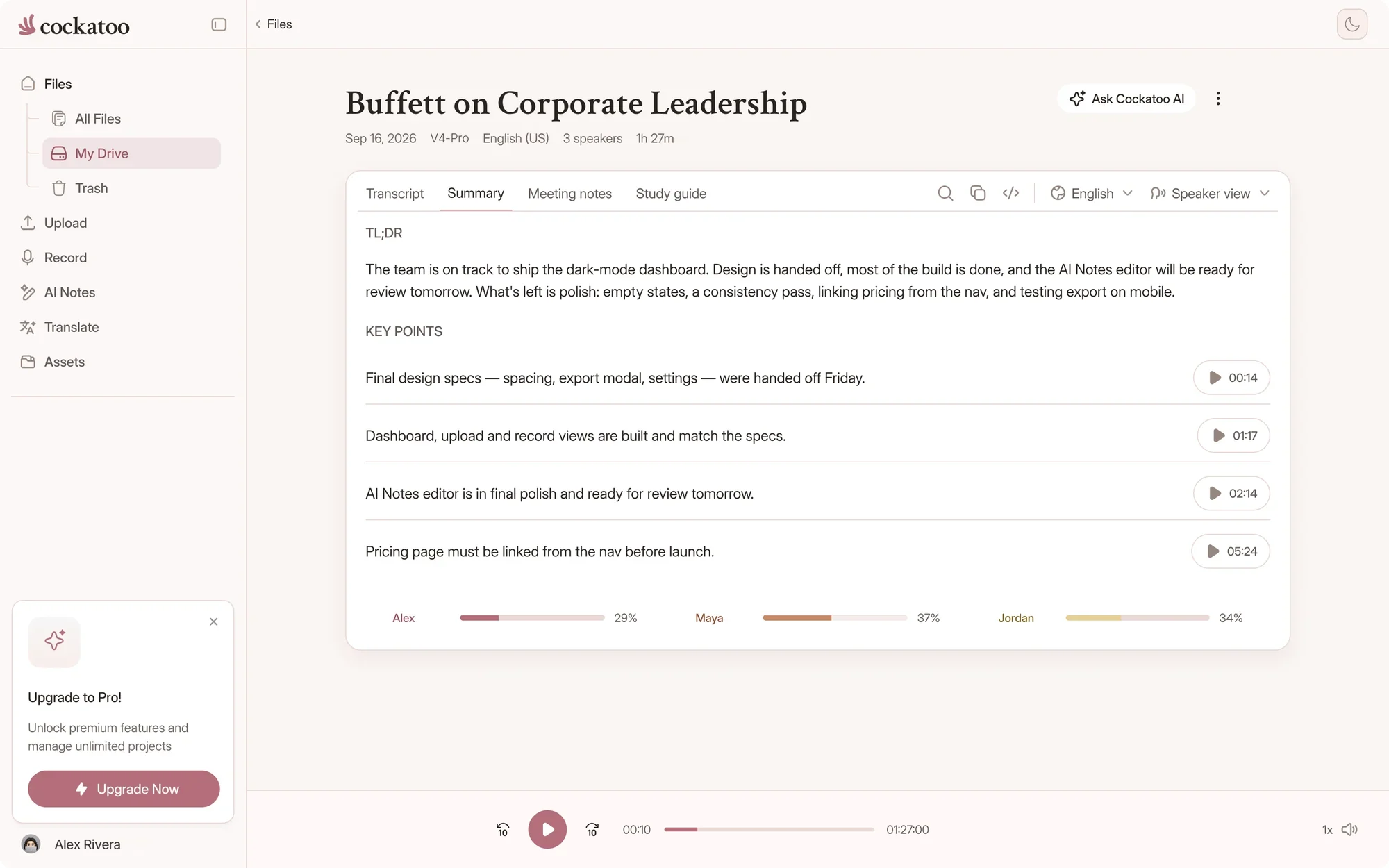
Cockatoo transcript with a one-click AI summary beside it

Browser Editor for Corrections Plus One-Click AI Summaries

Edit your transcript in the browser without downloading anything. Fix speaker names, correct technical terms, adjust punctuation. When you're done, click once to generate an AI summary using Canvas, Cockatoo's AI notes editor.

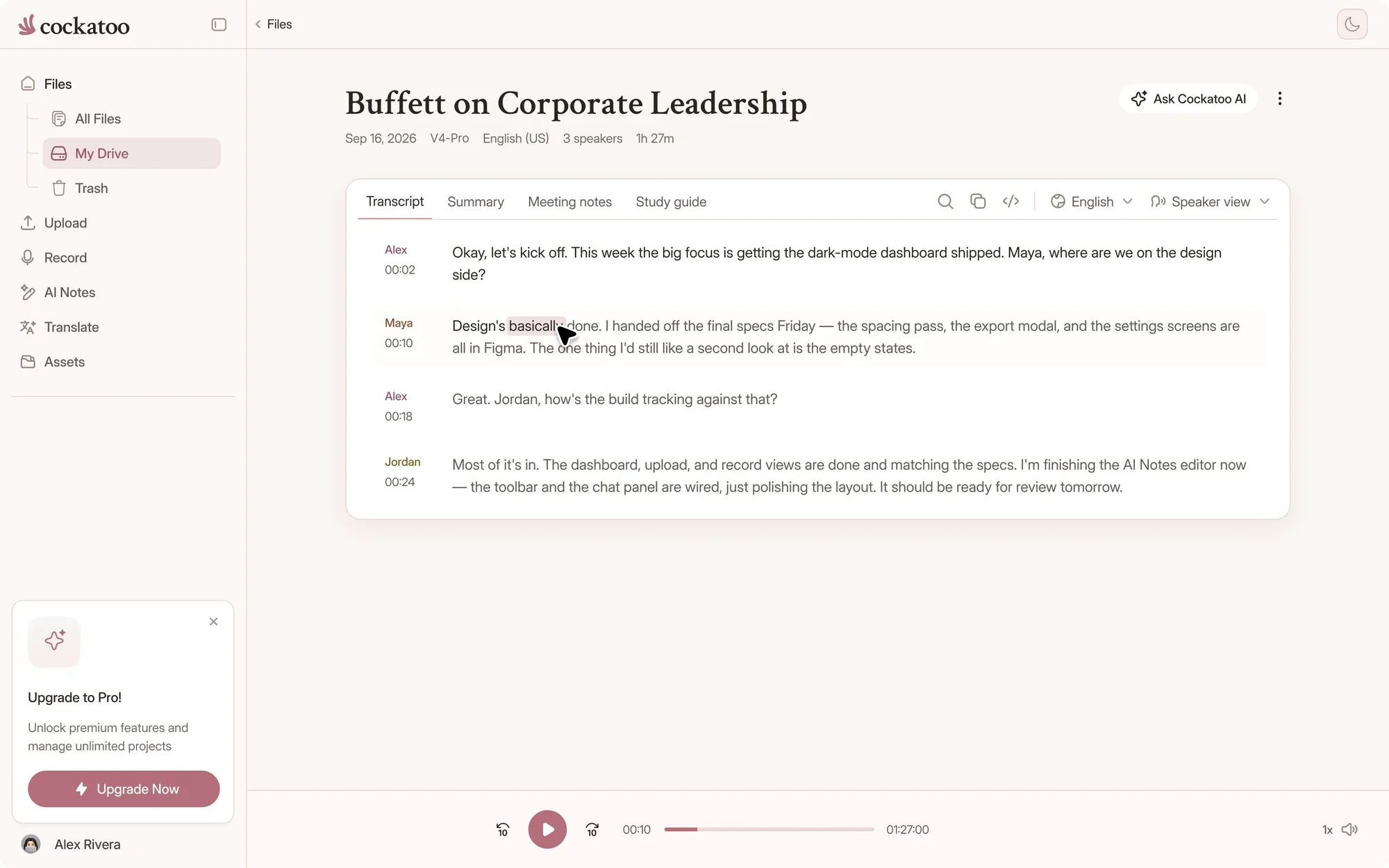
Correcting a single word in the Cockatoo transcript editor

Up to 120x Real-Time in Fastest Mode, Around 20x in Highest-Accuracy Mode

Cockatoo transcribes at up to 120x real-time in the fastest mode, V4-Flash.

The highest-accuracy mode, V4-Pro, runs around 20x, balancing speed with precision for compliance work. Choose the mode that fits your deadline and quality requirements.

Transcription mode

V4-FlashUp to 120x real timeFree, unlimited
V4-ProIndustry-leading accuracyAbout 20x real time
focus-group-2.mp3Transcribe

Import from YouTube, Dropbox, and Google Drive with Auto-Detect Language and RTL Display

Paste a YouTube link, paste a Dropbox or Google Drive link, or upload files directly. Cockatoo detects the spoken language, and right-to-left scripts like Arabic and Hebrew display correctly.

youtube.com/watch?v=seminar-week-4Import
  • Your device
  • YouTube
  • Google Drive
  • Dropbox
  • iCloud
  • Public file link

One-Hour File in About 30 Seconds

A 60-minute recording becomes a finished transcript in roughly half a minute in the fastest mode, so a whole course or webinar series is captioned the same afternoon.

Translation

Multilingual Accessibility and AODA Compliance

Translation helps people read your content in their own language. It adds to captions in the spoken language, it doesn't replace them.

Translate Spoken Audio, Not Only Written Documents

Transcribe a recording in one language, then translate the transcript into another. Cockatoo handles the full workflow: audio to text, then text to another language, all in one tool.

Translate PDF, DOCX, PPTX, XLSX, and TXT While Keeping Format

Upload a Word document, PowerPoint deck, Excel spreadsheet, PDF, or plain text file and translate it while keeping the document usable. Tables, bullet points and layout are kept where possible; scanned files come back with less precise formatting.

Detected languageالعربية
  • English
  • Español
  • العربية
  • 日本語
  • עברית
  • Deutsch
  • فارسی
  • Français
  • اردو

00:14 مرحبًا بكم في المحاضرة الرابعة

One Tool for Both: Extract Words from Audio, Translate to Another Language

Stop switching between a transcription tool and a translation service. Cockatoo does both. Get the words out of the audio, then get them into another language, all in the same platform. Free accounts get translation previews, and Pro translates whole transcripts.

FAQ

Frequently Asked Questions About Accessible Captions and Transcripts

Straight answers about compliance, captions, limits and support.

Visit the help center

Yes. Free accounts get unlimited full-length transcripts in V4-Flash, with no daily limit and no credit card. V4-Pro, the most accurate mode, comes with weekly previews on Free and a bigger allowance on paid plans, shown on the limits page, and paid plans take up to 20 files in one upload batch.

Make your next recording accessible

Get your full transcript free, with no daily limit. Export SRT or VTT captions in seconds, and try industry-leading accuracy with V4-Pro.

Start Transcribing Free