How to Transcribe Faster With Less Effort in 2026
Faster typing won't save you. The hours you lose to transcription hide in the correction loop, not the keyboard, and the fix is simpler than you think.
Transcription feels like a typing problem, and most prosumers at a small business, the one person who has to turn the recording into text, think the only real paths are: grind through it manually, or accept rough auto-captions and clean them up. Either way, it's going to take a long time. That assumption sends people straight to keyboard drills, foot pedals, and playback-speed tricks, and most still lose a full day to a single recording.
The real drag sits upstream of the keyboard entirely. If you have ever uploaded a recording to a fast transcription tool and still spent hours cleaning up the output, the problem was not your fingers. See our voice transcription app for how this works in practice.
Professional transcriptionists, working at full speed with foot pedals and purpose-built software, average four to six minutes of work per audio minute. To put that in perspective, transcribing 20 hours of audio can take 80 to 120 hours of work, confirming just how labor-intensive transcription projects can become at scale. That puts a clean one-hour interview at four to six hours of focused work, before any formatting or review. For a marketing coordinator handling a 90-minute client interview alongside a normal Tuesday, that math is brutal. Add background noise, crosstalk, or a strong accent, and the ratio climbs further.
A rough draft is faster than a blank page, but draft quality matters enormously. Across the market, automatic captions carry an average word error rate of around 12 percent on standard speech, rising sharply with accented speakers, technical vocabulary, or overlapping voices. Across a one-hour transcript, that means hundreds of wrong words requiring word-by-word comparison against the original audio, so you end up listening again anyway.
The actual time sink is correction latency, the slow, word-by-word repair loop that bad source material or inaccurate auto-captions force on you. Shaving two seconds off each keystroke does nothing when you are rewinding the same fifteen seconds of audio for the fourth time. The bottleneck is fixable, but the fix is a faster keyboard.
Key takeaways
- The bottleneck in transcription has never been typing speed, it's the fact that manual transcription of a one-hour recording takes most of a working day, not one hour.
- Keyboard drills, foot pedals, and playback-speed tricks optimize the wrong layer entirely; they reduce fatigue at the margins but don't change the fundamental throughput ceiling.
- Hardware matters for sustaining accuracy over long sessions, not for raw speed, fatigue compounds transcription errors quietly, then all at once, and cleanup time grows faster than the transcript does.
- Text expanders and transcription software save real time, but treating them as interchangeable is the mistake that keeps most people stuck, they don't save equal amounts, and stacking them in the wrong order compounds the waste.
- Three phases of a manual transcription session account for the majority of wasted time, and each has a discrete fix that compounds savings across every recording you process.
- Engine architecture, not operator skill, workflow optimization, or hardware, is the singular determinant of transcription throughput once AI enters the picture.
- Cockatoo's transcription engine processes a one-hour file in about 30 seconds at its fastest mode (up to 120x real-time); a highest-accuracy mode runs around 25x real-time, and a mode selector lets you stay on a prior engine version if output style changes matter to your workflow.
How AI Transcription Works and Why It Beats Manual Every Time
It takes most of a working day.
The sheer volume of recordings makes manual transcription practically unworkable.
Why AI Transcription Decouples Listening From Text Production
Research evaluating end-to-end ASR models measures processing speed as a ratio of audio duration to inference time. A model can work through a one-hour file in a fraction of that hour rather than in real time. Cockatoo's fastest mode processes audio at roughly 120 times real-time speed; its highest-accuracy mode runs at approximately 25 times real-time, so a 60-minute interview that would occupy a journalist or researcher for the better part of a day is returned as a structured draft in minutes.
The human bottleneck, the cognitive cost of holding speech in working memory while simultaneously forming written words, simply does not exist in this architecture.
Cockatoo's transcription handles multiple languages, with per-language accuracy detailed on its benchmarks page, making it a practical tool for multilingual research, international interviews, and medical consultations conducted across language lines, contexts where the manual alternative is often not feasible at all.
The Honest Speed Math - Human Typist vs. AI Engine
The standard industry figure for manual transcription is 4 to 6 hours of human time per 1 hour of audio, accounting for playback pauses, rewinds, and proofreading.
The gap isn't incremental. It's a category change.
Per-minute pricing models expose this clearly: a podcaster working through a back catalog of 200 episodes, each running 45 to 60 minutes, faces costs that become prohibitive fast.
For teams, clinics, newsrooms, and research groups, the Team plan extends the same unlimited model across a minimum of three seats, with centralised billing and shared transcript editing, so the cost doesn't fall on any one individual. The pattern of physicians being asked to absorb $1,700 a year out of pocket for tools whose productivity benefits flow to their employer is exactly the kind of structural problem a flat-rate team plan is built to avoid.
From Producer to Editor - Why the 80-90% Accurate Draft Changes Your Job
AI transcription generates a draft that is often highly accurate on clean audio, a standard reflected in published benchmarks including the evaluation of end-to-end ASR models, which documents word error rates across recording conditions. Accuracy varies meaningfully by engine, audio quality, and speaker clarity; Cockatoo's highest-accuracy mode consistently outperforms faster modes on the same files, and the tradeoff between speed and accuracy is visible and selectable.
Generating text from audio is a production task: active listening, motor output, and error correction all running simultaneously. Cognitive research consistently shows that recognition is faster than recall, which is why correcting a sentence takes less mental effort than composing it from nothing.
Cockatoo's in-browser transcript editor and AI Notes (Canvas) keep that editorial work in one place.
Related Reading
- What Is Voicemail Transcription
- Can I Get A Transcript Of A Phone Call
- Best Voice Transcription App
- How To Transcribe Interviews
- Transcript Vs Transcription
- Types Of Transcription
- How To Extract Words From Pdf
- Focus Group Transcription
What Hardware Tools Speed Up Transcription Worth Buying
Hardware choices matter less for raw speed than for how long accuracy holds. A transcriptionist handling two or three hours of audio per week will hit the accuracy wall well before hitting any words-per-minute ceiling. Fatigue compounds errors quietly, then all at once, and cleanup time grows faster than the transcript does. The right equipment extends how long you can type accurately before that curve bends against you. Here is what each tool actually buys you, ranked by real impact.
1. USB Foot Pedal - Hands-Free Playback Control for Unbroken Typing Rhythm

A USB foot pedal keeps both hands on the keyboard home row while you control play, pause, and rewind with your foot. Transcriptionists using a USB foot pedal like the Olympus RS-31H with a dedicated transcription player such as Express Scribe report measurable reductions in the stop-start interruptions that fragment typing rhythm. The tradeoff: there is a 20-to-30-minute learning curve before the control feels natural, and the gain is marginal if you transcribe fewer than two hours of audio per week.
2. Mechanical Split Keyboard - Tactile Feedback That Sustains Speed Over Long Sessions
Tactile mechanical switches give your fingers clear physical confirmation of each keystroke, which reduces the unconscious muscle tension that builds across a multi-hour session. Industry ergonomics research links flat membrane keyboards to higher cumulative finger fatigue and rising error rates after the 90-minute mark. A split layout adds wrist alignment benefits. The honest limitation: a quality mechanical split keyboard costs $100 to $200, which is hard to justify if your transcription load is occasional rather than regular.
3. Closed-Back Noise-Isolating Headphones - Clearer Audio That Reduces Deciphering Strain

Closed-back headphones are the most underrated item on this list. When a recording is muffled or noisy, your brain works harder to fill in missing phonemes, and that cognitive load is exhausting in a way that accumulates invisibly. Noise isolation reduces that strain, which means fewer replays and fewer [inaudible] placeholders to chase down later. Most beneficial when your source recordings are phone calls, field interviews, or anything captured on a consumer microphone in a reverberant room. Pairing closed-back headphones with a playback tool like VLC media player with hotkeys configured for rewind and speed control compounds the benefit further.
4. Ergonomic Wrist and Monitor Posture Setup - The Physical Foundation That Protects Sustained Output Speed
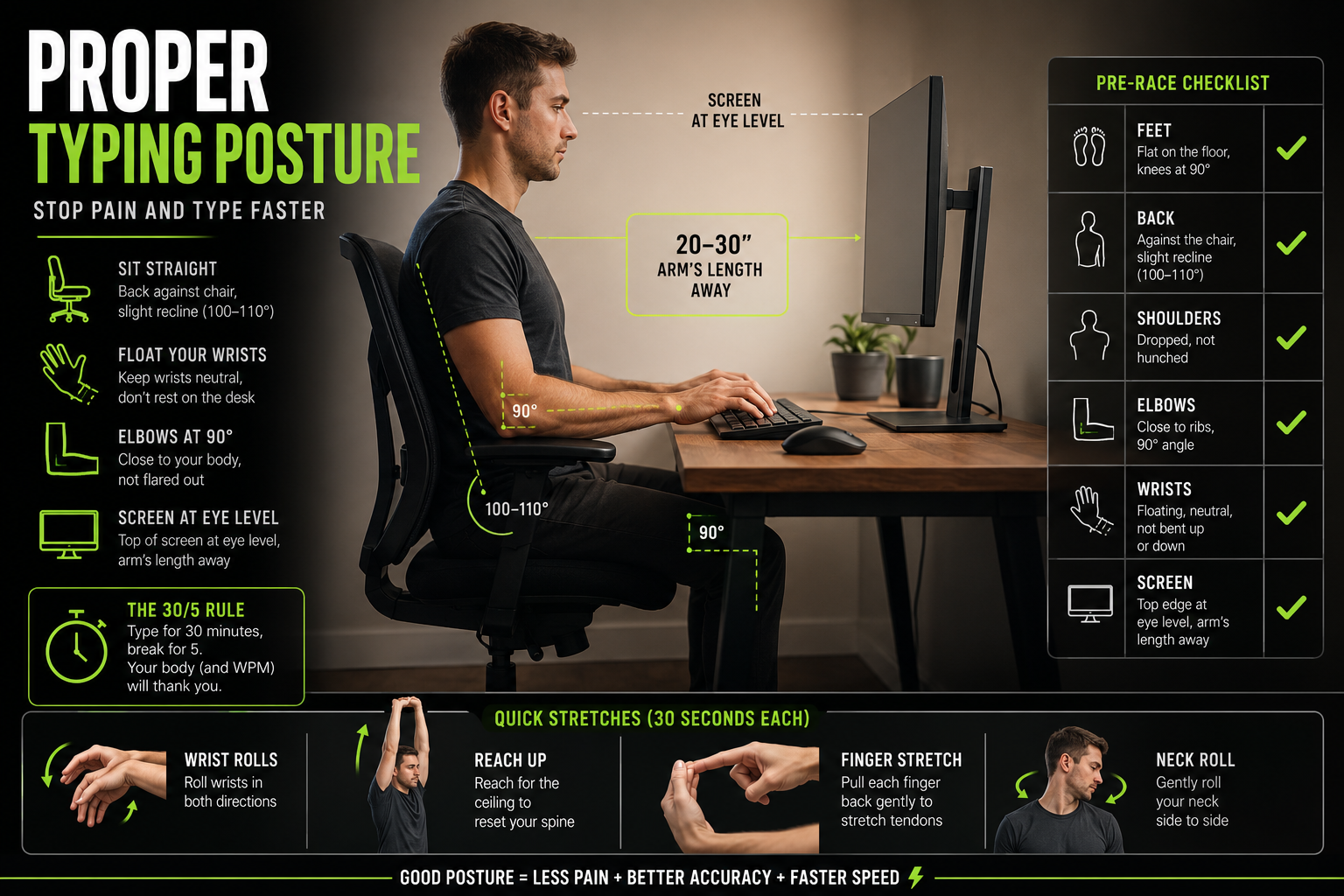
Wrist alignment and screen height are output variables. Occupational health studies on typists and data-entry workers show that repetitive strain injuries affect a significant share of full-time transcriptionists, and the onset is directly linked to poor posture sustained over months. Wrist rests, a chair at the right height, and forearms parallel to the desk cost almost nothing to configure and protect the hours you can work before pain forces a break.
5. Adjustable Monitor Arm - Eye-Level Screen Positioning That Eliminates Neck Fatigue

Screens positioned below eye level create forward head posture, which loads the cervical spine and produces neck fatigue that degrades sustained output speed before finger or ear fatigue arrives. A monitor arm costs $30 to $80 and moves the screen to the exact height your posture needs. It is the lowest-cost item here relative to the fatigue it prevents, and unlike a keyboard upgrade, it benefits anyone who sits at a desk for more than an hour at a time.
Here is the honest ceiling on all of this: typing speed, foot pedals, and playback-rate tricks are all optimizations to the same fundamentally broken manual loop. They compress hours into slightly fewer hours, but the ceiling on speed is set by the human. Switching to an AI engine with a real-time factor below 1.0 eliminates that loop entirely, delivering gains measured in hours per file rather than minutes per hour. Every dollar and hour spent optimizing manual transcription hardware is money spent making the wrong process faster. The part-time transcriber who has already invested in solid hardware will still spend most of a working day on a one-hour recording, and that is the fatigue source hardware alone cannot reach.
When an AI transcription tool handles the first-pass conversion at speeds that can process a recording in a fraction of its original duration, Cockatoo's fastest mode reaches up to 120x real-time on Pro, turning a multi-hour file into a finished draft in under a minute, your physical setup only needs to sustain a focused editing pass rather than a full production session. The fatigue wall moves dramatically further out because the heaviest cognitive lift, listening and typing simultaneously for every minute of audio, is no longer yours to carry.
Hardware optimizes the body for the work that remains after AI handles the bulk of production. The software layer sitting between your audio file and your finished transcript carries its own set of speed multipliers that most transcribers never configure. The next section ranks those tools by the size of the time saving they actually deliver, so you know exactly where to spend setup effort first.
What Software Tools Automate or Accelerate Transcription Beyond Typing
Three software tools sit between a transcriptionist and a faster output, but they do not save equal amounts of time. Treating them as interchangeable is the mistake that keeps most people optimizing the wrong layer.
1. Text Expansion Software (PhraseExpress, Espanso, AutoHotkey) - Type 2 Characters, Output Full Phrases
Text expanders let you type a short code that instantly expands into a full phrase. Type `intv` and get `Interviewer:` across every line of a 45-minute transcript. Industry research puts effective output past 200 words per minute when expanders are loaded with domain-specific shortcuts, compared to the 70-80 WPM baseline a professional typist manages unaided. The real tradeoff: building a library that actually pays off takes several hours of setup, and the habit of using codes reliably takes a week or two to form.
One underappreciated use case: if you work with audio or documents in more than one language, your expander library needs to reflect that. A transcriptionist handling multilingual files quickly discovers that a single-language shorthand set breaks down the moment the speaker switches tongues or the client sends a document in another language. Building language-aware snippet groups from the start, one set per language you regularly encounter, prevents that bottleneck later.
2. Dedicated Transcription Players (Express Scribe) - Foot Pedal, Speed Control, and Timestamp Integration Built In
A dedicated player like Express Scribe pairs with a USB foot pedal so your hands never leave the keyboard to hit pause. That alone removes the constant hand-switching that breaks typing rhythm on every rewind. Independent user reports on transcription forums put the throughput gain at roughly 30-40% over standard media players, though the exact figure depends on file quality and speaker pace. (This figure is anecdotal; if precise gains matter for your workflow, run a timed comparison on your own audio.) The limitation: the foot pedal and software together cost money and time to configure, and the gain is meaningful only inside a manual typing workflow.
3. Vowel-Drop Shorthand for High-Frequency Long Words - 'Thk' for 'Think', 'Mdl' for 'Middle'
Dropping vowels from long, frequent words is the lowest-cost speed layer available: no software to install, no hardware to buy. Write `thk` for `think`, `mdl` for `middle`, `bg` for `background`. The method compounds when combined with a text expander, since your shorthand codes become the trigger strings. The ceiling is low compared to the other tiers, and it only helps during manual typing, so its value shrinks the moment an AI engine is handling the first draft.
4. The Real Hierarchy of Time Savings - AI Engine First, Then Expanders, Then Dedicated Player, Then Generic Shortcuts
Most transcription guides treat AI auto-transcription, text expanders, dedicated players, and keyboard shortcuts as interchangeable productivity tips. They aren't. AI engines (Otter, Whisper, Descript) deliver the largest raw time reduction by generating a draft to correct rather than a blank page to fill. Text expanders rank second, dedicated players third, and generic OS shortcuts last. Misallocating setup effort, spending hours on shortcuts while skipping AI, is the most common speed plateau mistake.
5. Espanso - Open-Source, Cross-Platform Text Expander With YAML-Based Snippet Configuration
Espanso runs on Windows, macOS, and Linux at no cost, which makes it the default recommendation for transcriptionists who work across machines or want to avoid a subscription. The tradeoff is real: snippets are configured in YAML files rather than a visual interface, and active AutoHotkey users note occasional keyboard hook drops on Windows that require a restart. PhraseExpress offers a more polished interface with a free tier for personal use, but its advanced features require a paid licence. AutoHotkey gives the most control but demands scripting comfort most transcriptionists do not have.
The moment an AI engine enters the workflow, the calculus for every tool above shifts. An AI transcription tool like Cockatoo, whose fastest mode can process a one-hour file in roughly 30 seconds on Pro, means the human's job moves from filling a blank page to correcting a near-complete draft. Text expanders and dedicated players then apply to a fraction of the original word volume, which compounds their value rather than replaces it. The smartest stack selects the AI engine first, then builds the manual-assist layer around what the engine leaves behind.
Two output needs that often get deprioritised until they become urgent are published captions and document translation:
- If a video needs captioned subtitles for a platform upload, Cockatoo exports directly to SRT on Pro, with no secondary tool or format conversion step required.
- If a document has to be read or sent in another language, language support varies by transcription mode (see benchmarks page for per-language coverage); supported file types include PDF, DOCX, PPTX, XLSX, and TXT.
Both capabilities sit inside the same interface as transcription, which matters because switching between four specialist tools is exactly the kind of friction that erodes a fast workflow. Cockatoo's Free tier costs $0 and requires no credit card, so the AI layer of the stack can be validated before any budget decision is made, three files per day, up to 30 minutes each, with all export types available.
Knowing which tool to reach for first is only half the equation. The other half is knowing exactly when and how to deploy each layer inside a repeatable session. The next section maps that out as a concrete before, during, and after workflow so you can see precisely where your current process is leaking the most time.
Related Reading
- How To Transcribe Youtube Video
- Best Transcription Software For Qualitative Research
- Meeting Transcription And Summary Ai Tools
- Best Lecture Transcription App
- Market Research Transcription
- Qualitative Research Transcription
- Business Transcription
- Podcast Transcription Software
- Automatic Video Transcription Software
- Best Medical Transcription Software
- Best Closed Captioning Software
- Best Transcription App For Iphone
- Zoom Ai Transcription
- Best Transcription Software For Interviews
The Step-by-Step Transcription Workflow That Cuts Audio Hours to Minutes
Research into manual transcription workflows consistently shows that the majority of wasted session time clusters in three specific phases, and most of it is invisible until you're already an hour deep.
Before You Hit Play, Strip the Noise That Forces Rewinding
Clean audio before you transcribe. Across the market, applying EQ filters to strip room hum and air conditioning noise is a prerequisite step, because garbage audio in means garbage transcript out regardless of how good your engine is. Even the best ASR engine degrades on noisy input, and faster inference modes sacrifice accuracy under poor audio conditions, so pre-processing your audio is what unlocks the high-accuracy, high-speed mode of the engine and prevents the accuracy penalty that forces a full manual correction pass afterward.
Pre-processing with a free tool like Audacity (noise reduction filter, then normalize to around -3 dB) takes five minutes and substantially reduces downstream correction burden, particularly for recordings with consistent background noise.
Playback Speed Is a Dial, Not a Toggle
Playback speed should change with the speaker, not stay fixed. What most teams report is that speeding up to 1.1x–1.2x for slow or clear speakers, and slowing to 80% when you find yourself rewinding frequently, yields the best results. The 80% floor signals the audio needs pre-processing, not just a slower rate.
The Lag Method and the Placeholder Rule, Two Habits That Kill Stop-Start Momentum
Stop pausing the audio every few seconds. The Lag Method involves building a 3-5 second mental buffer and typing while the speaker continues talking; this keeps momentum intact and eliminates the constant stop-start cycle that compounds into significant lost time.
For unclear sections, type `[inaudible 04:12]` and keep moving. Return at the end with surrounding context, which makes the unclear word far easier to resolve than it was mid-stream. This is the step most transcriptionists skip, and why they spend 20 minutes on a 10-second audio gap instead of 90 seconds.
After the Draft, Why a Single Editing Pass Beats Fixing as You Go
Broader industry trends point to this directly: not stopping to fix minor errors during transcription, and trusting backspace and autocorrect later, is a core technique for maintaining rhythm. Consolidating all corrections into a single dedicated pass at the end is consistently faster than interrupting the draft to fix errors in real time.
How a Modern Transcription Engine Finishes in Seconds What Took You Hours
The real ceiling on how quickly audio becomes text is set by the engine processing it, not by how efficiently you work around it.
Processing Speed Is the Real Ceiling, Not Your Typing WPM
"People transcribing 15-25 hours of audio per month face a significant time burden, highlighting how long manual or slow transcription workflows take compared to modern AI engines that finish in seconds."
— what we hear from audio transcription users
Across the market, the choice of engine architecture is the primary determinant of transcription throughput. Model size, decoding strategy, and hardware utilization set the hard ceiling on how fast audio becomes text. Operator skill and workflow habits live below that ceiling; they cannot raise it.
The difference in practice is stark: an engine running at 120x real-time finishes a one-hour file in about 30 seconds, while one running at 3x real-time takes 20 minutes for the same file.
Every workflow optimization built on top of a slow engine is optimization theater.
Fastest Mode vs. Highest-Accuracy Mode - Choosing the Right Tool for Each File
Use fastest mode when turnaround time matters more than perfection, and switch to highest-accuracy mode when the recording has background noise, heavy accents, or technical vocabulary where a wrong word changes meaning.
Why Unlimited Plans Are Not All the Same
"Unlimited" is doing a lot of work in most transcription pricing pages. A common pattern is a plan that advertises unlimited transcription but quietly enforces an hourly ceiling, revealed only in the fine print or after a user hits it mid-project. Professionals with high monthly transcription volumes often report hitting advertised caps faster than expected, then facing overage charges or forced upgrades, a pattern worth checking for in any tool's settings page before committing.
The question to ask before committing: does "unlimited" apply to all modes, or only to the slower ones? Read the settings page, not just the marketing page.
In-House Inference vs. API Reselling - Why Engine Architecture Affects Your Bill
Many transcription tools call a third-party API, mark up the cost, and pass it to you as a subscription. That model ties every minute of audio you submit to a per-call cost the provider must absorb or pass on. An in-house inference engine changes that equation.
When compute is owned rather than rented per call, a flat subscription can cover genuinely unlimited volume on default modes. Cockatoo runs its own inference engine, a structural difference that removes per-call API costs from the equation and is what makes flat-rate, volume-unlimited transcription on standard modes viable at a single Pro subscription price, as reflected in how the plan is architected and priced.
Related Reading
- Happy Scribe Vs Otter
- Notta Alternatives
- Rev Alternatives
- Happy Scribe Vs Trint
- Rev Vs Scribie
- Rev Vs Otter
- Rev Vs Gotranscript
- Trint Vs Temi
- Best Asr Transcription Software
Next steps
If your recordings are still consuming most of a working day despite every shortcut you've tried, the path forward starts with recognizing that the constraint was never your fingers or your workflow, it was the tool you gave them. Start with our voice transcription app.
Engine architecture, not operator skill, sets the hard ceiling on transcription throughput, which means every hour spent optimizing a manual loop is effort applied to the wrong layer. That insight points directly to a second one: audio quality and engine selection are a matched pair, and front-loading a five-minute noise reduction pass before upload is what activates the high-accuracy, high-speed mode of the engine and eliminates the correction backlog before it starts. Those two moves in sequence, pick the right engine, then pre-process the audio, are what collapse a four-to-six hour manual session into a focused editing pass measured in minutes. Together, they point to one action: test the engine on a real file before changing anything else in your process.
Start with the voice transcription app on a recording you already have. Drop in a 30-minute interview, run it through the fastest mode, and compare the output to the last auto-caption you corrected by hand. The free tier requires no credit card and no configuration. That single comparison gives you the evidence to decide with confidence rather than faith.
Frequently Asked Questions
How long does it actually take to transcribe one hour of audio?
Manual transcription takes 4 to 6 hours of human time per hour of audio, accounting for playback pauses, rewinds, and proofreading. AI transcription tools like Cockatoo process the same file in minutes, Cockatoo's fastest mode runs at roughly 120 times real-time speed, and even its highest-accuracy mode runs at approximately 25 times real-time.
Do I need to be a fast typist to transcribe efficiently?
Typing speed is not the real bottleneck. The actual time sink is correction latency, the slow, word-by-word repair loop that bad source audio or inaccurate auto-captions force on you. Professional transcriptionists working at full speed with foot pedals and purpose-built software still average four to six minutes of work per audio minute, so the ceiling on typing speed simply isn't high enough to matter.
Is it worth cleaning up auto-captions instead of transcribing from scratch?
It depends heavily on accuracy. Automatic captions carry an average word error rate of around 12 percent on standard speech, rising sharply with accented speakers, technical vocabulary, or overlapping voices. Across a one-hour transcript that means hundreds of wrong words requiring word-by-word comparison against the original audio, meaning you end up listening again anyway.
How much does AI transcription cost compared to doing it manually?
The post highlights that per-minute pricing models can become prohibitive fast, for example, a podcaster working through a back catalog of 200 episodes faces costs that add up quickly. Cockatoo's Pro plan offers unlimited transcription, file translations, and Canvas at $11.99 USD per month billed annually with no monthly hour cap, while the Team plan extends the same unlimited model across a minimum of three seats with centralized billing.
What's the single most impactful hardware upgrade for transcription?
Closed-back noise-isolating headphones are described as the most underrated item on the list. When a recording is muffled or noisy, your brain works harder to fill in missing sounds, leading to more replays and more inaudible placeholders, noise isolation directly reduces that cognitive strain. That said, the post is clear that all hardware optimizations still work within a fundamentally slower manual loop, and switching to an AI transcription engine delivers gains measured in hours per file rather than minutes per hour.